
Light indicators and speaker
Warning sounds and indicator lights must be adjusted to the site during commissioning—see Commissioning
The robot uses its speaker and of light indicators to communicate its status and intentions:
Status lights: LED light bands on all four sides of the robot use colors and patterns to signal the robot's current status.
Signal lights: Lights at the front and back of the robot indicate turning and backward movement. Front lights are white, rear lights are red, and blinking indicates turns.
Speaker: Plays sounds to alert personnel. Can be triggered by zones, mission actions, or when Protective fields are muted.
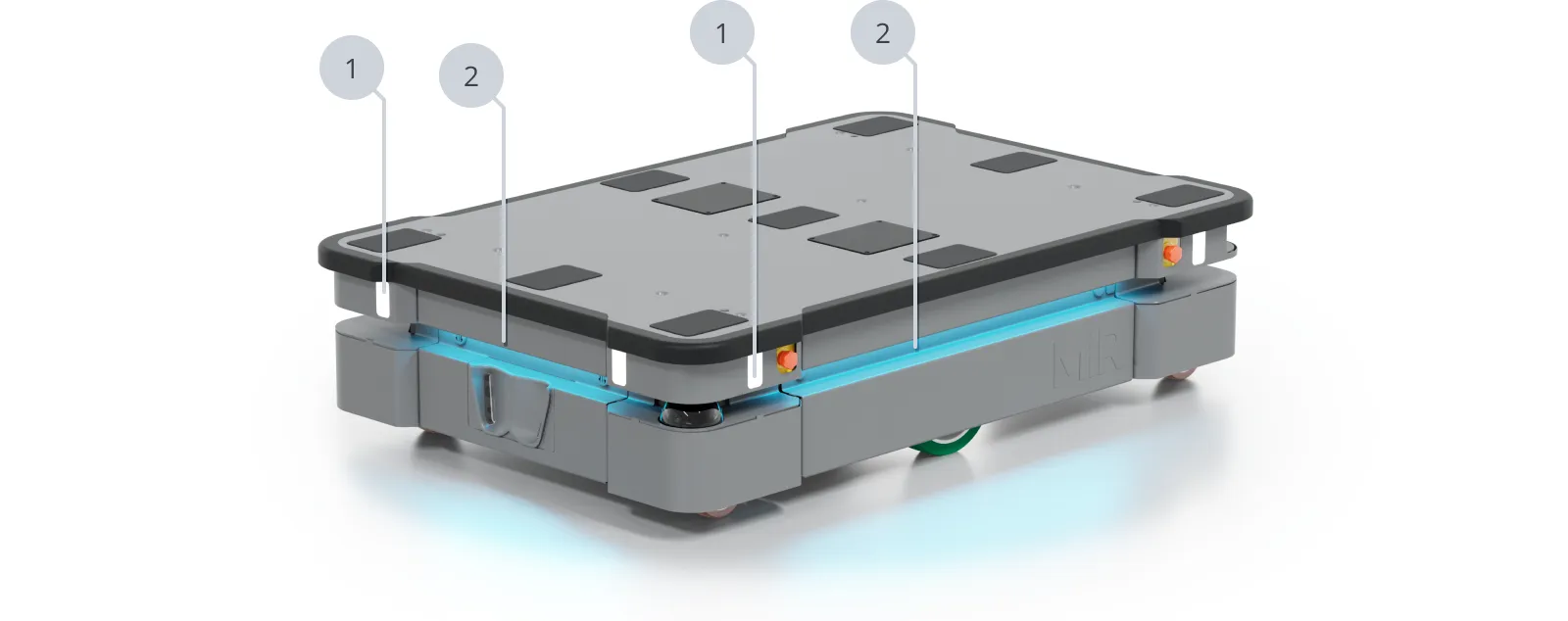
| Pos. | Description | Pos. | Description |
|---|---|---|---|
| 1 | Signal lights | 2 | Status lights |
Status lights
The LED light bands around the robot indicate its operational state:
Emergency stop or Protective stop
Ready for job
Drives to destination
Goal/Path blocked
Planning path
Mission paused
Startup signal before PC is active
Shutting down robot
Relative move, ignoring obstacles
General error
Manual drive
Mapping
Charging at charging station
Waiting for MiR Fleet resource or for another MiR robot to move
When battery is critically low (0-1%), the ends of the status lights flash red.
Signal lights
The signal lights indicate the following robot behavior:
When the robot turns, the signal lights on the side the robot is turning to flash white.
When the Protective fields are muted, all signal lights flash. This is accompanied by auditory warning sounds.
When the robot is at standstill for longer than 10 seconds the signal lights turn off.
When the robot begins moving after being at standstill, the signal lights turn on 2 seconds before the robot moves. This is accompanied by auditory warning sounds.
This behavior was introduced in software 3.6.0 and MiR Fleet Enterprise 1.2.0. You can disable this behavior in the robot interface under System > Settings > Features > Motion warning.

WARNING
If the robot starts up unexpectedly, there is a risk of injury to nearby personnel or damage to equipment.
- Train personnel in the meaning of the signal and status lights.
- Inform personnel that robot flashes its signal lights and emits warning sounds before is starts moving after being at standstill for longer than 10 seconds.
- Adjust the volume of the warning sounds if they cannot be heard.
- Do not disable the Motion warning feature in the robot settings. This will also void certification for the following standards: ISO 3691-4, UL3100, and RIA 15.08
Sounds
Configure standard sounds you can use in missions and zones under Setup > Sounds.
The robot plays sounds automatically for safety reasons when:
- The robot mutes its Protective fields.
- The robot begins moving after being at standstill for longer than 10 seconds.
The safety sound can be adjusted in System > Settings > Features.
WARNING
Unaware personnel may not see the robot and risk colliding with the robot. This may result in injury to personnel or damage to equipment.
- Adjust warning sound volume to be audible in the work environment
- Implement warning sounds in high-risk areas and missions
- Do not disable warning sounds.