
Emergency stop
When you press an Emergency stop button on the robot, the robot enters Emergency stop—see Types of stop.
You can connect a circuit of any number of Emergency stop buttons to the Auxiliary emergency stop interface. These are intended for Emergency stop buttons on the connected top module. When the circuit is closed, the robot can operate. When the circuit breaks, the robot enters Emergency stop.
If you do not connect a closed circuit from your top module, you must connect a dummy plug or Emergency stop box that connects the appropriate pins in Auxiliary emergency stop interface to close the circuit.
To see which pins in the electrical interface support this function, see Emergency stop
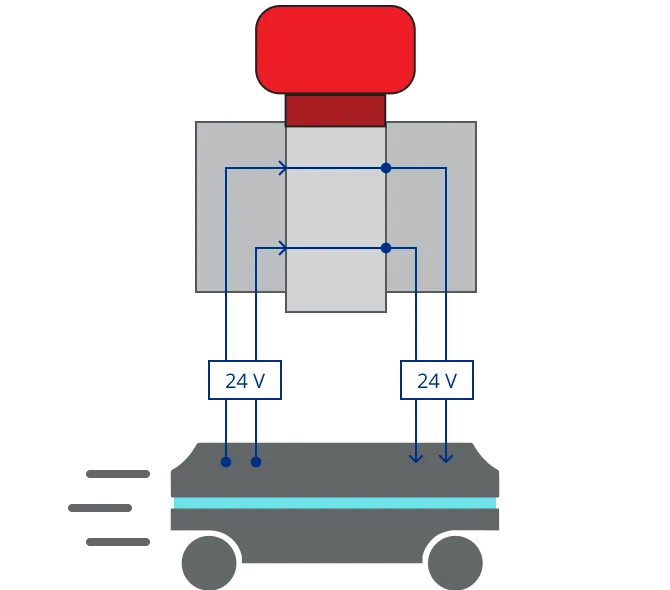
Emergency stop button released
If the input pins deliver 24 V to the robot, it can operate.
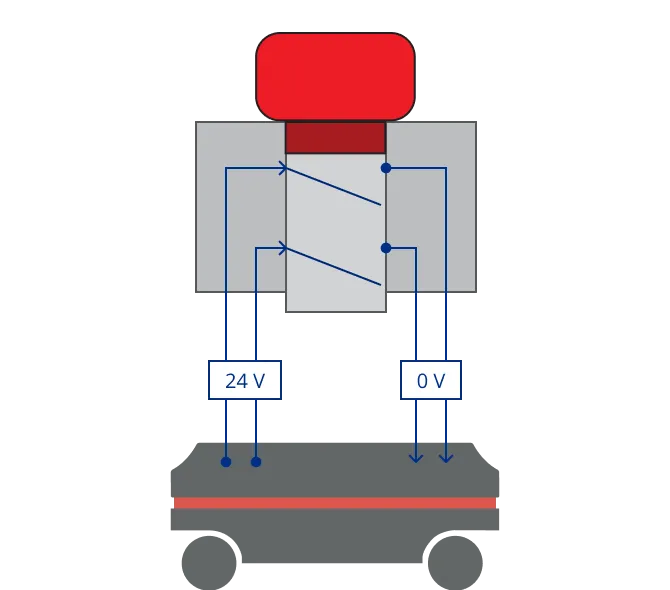
Emergency stop button pushed
When you push a connected Emergency stop button, both pins deliver 0 V, and the robot enters Emergency stop.

CAUTION
Emergency stop buttons are not designed for frequent use. If a button has been used too many times, it may fail to stop the robot in an emergency situation, and nearby personnel may be injured by a collision with moving parts.
- Only press Emergency stop buttons in emergencies.
- Check that all Emergency stop buttons are fully functional—see Maintenance and handling.
- Use the robot interface to stop the robot in non-emergency situations.