
Electrical interfaces
The robot has seven electrical interfaces in the left and right top compartments:
- Robot's left top compartment:
- Power
- Emergency stop
- Ethernet
- Robot's right top compartment:
- GPIO A
- GPIO B
- Auxiliary Safety Functions A
- Auxiliary Safety Functions B
For the location of the electrical interfaces, see Internal parts.
Emergency stop
For more information on how to use the Emergency stop interface, see Emergency stop.
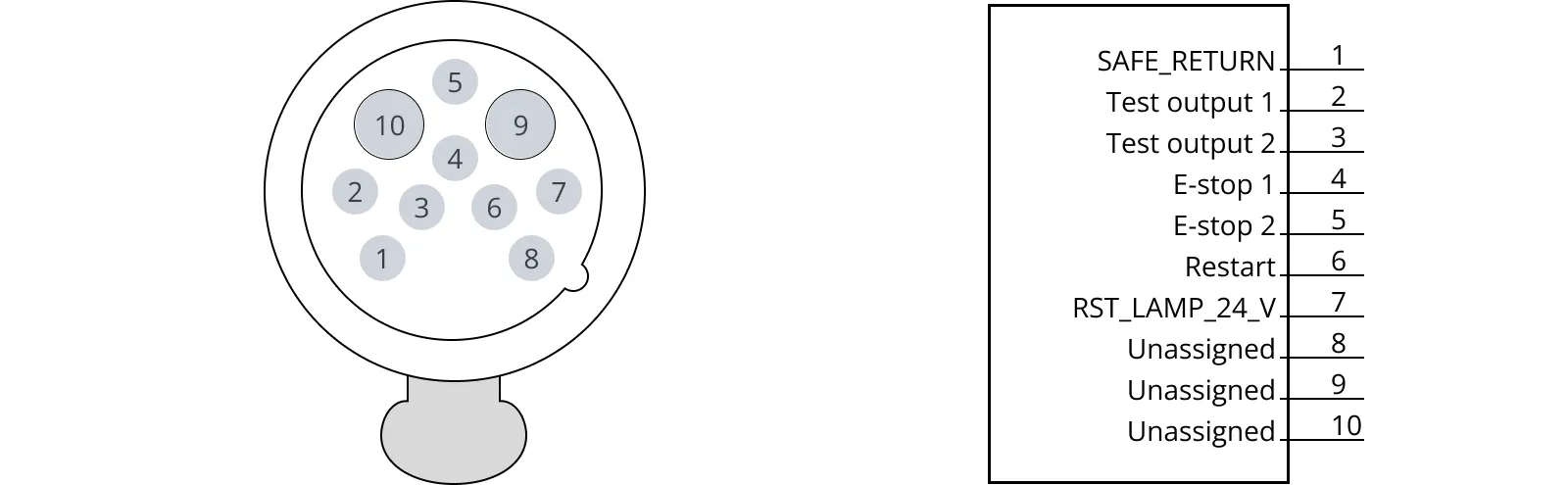
| Pin | Name | Type | Function |
|---|---|---|---|
| 1 | SAFE_RETURN | Ground | Return for lamp signal. |
| 2 | Test output 1 | Output | Safety output 1. Should be connected through Emergency stop buttons to pin 4. |
| 3 | Test output 2 | Output | Safety output 2. Should be connected through Emergency stop buttons to pin 5. |
| 4 | E-stop 1 | Input | Safety input 1. Should be connected through Emergency stop buttons to pin 2. |
| 5 | E-stop 2 | Input | Safety input 2. Should be connected through Emergency stop buttons to pin 3. |
| 6 | Restart | Input | Safety input 3. When receiving 24 V will restart the Emergency stop. |
| 7 | RST_LAMP_24_V | Output | 24 V output for powering the lamp on the Emergency stop box. |
8 | Not connected to the robot | ||
9 | Not connected to the robot | ||
10 | Not connected to the robot |
Power

CAUTION
Connecting an unsupported device to the Power interface can damage the robot or result in injury to personnel from electrocution or burns.
- Do not connect power and ground signals to the chassis.
- Do not stack the 24 V and 48 V power supplies.
- Do not connect 48 V power supplies to 24 V pins or vice versa.
- Do not connect a top module that can deliver an inverse current to the robot interfaces.
- Ensure connected devices do not have a capacitance of more than 2 000 µF combined from pins 1 and 3. If they do, integrate a softstarter that keeps the current under 2 A for the first 100 ms.
- Ensure connected devices do not draw more than 10 A combined from pins 1 and 3 while the robot is driving.
- Ensure connected devices do not draw more than 10 A combined from pins 1 and 3 while the robot is at standstill.
The maximum current across pins 1 and 3 combined is 10 A.
The maximum capacitance of devices connected to pins 1 and 3 is 2 000 µF combined. If your device has a higher capacitance, you must integrate your own softstarter that keeps the current under 2 A for the first 100 ms, and thereafter under 10 A.
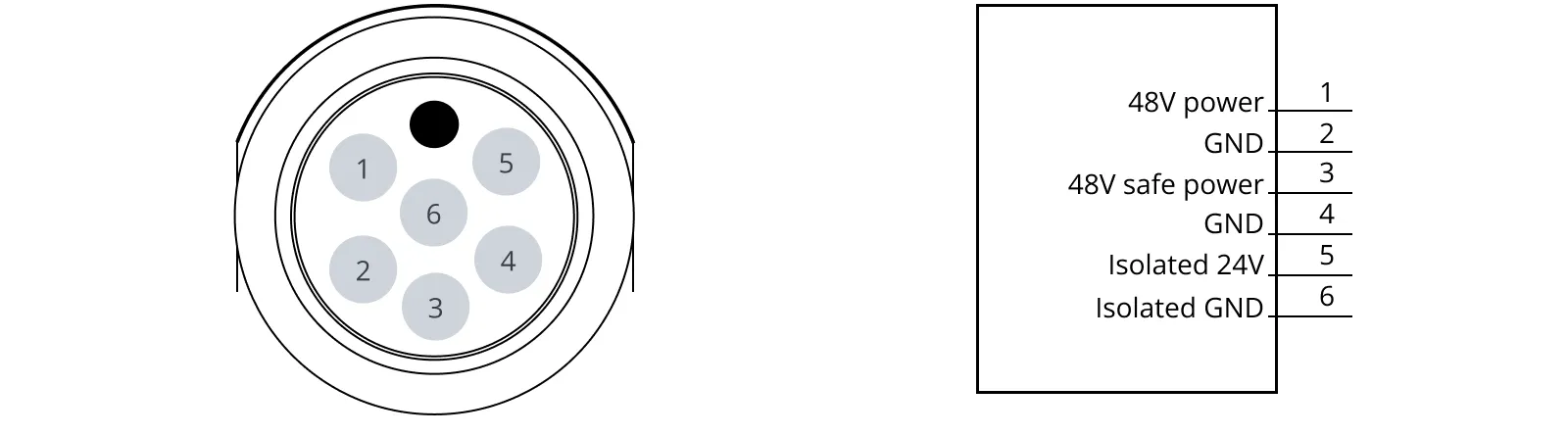
| Pin | Name | Limits | Function |
|---|---|---|---|
1 | 48V power | 10 A across pins 1 and 3 42–54 V, with reference to pins 2 and 4 | Always active when robot is on. Intended for high-power loads like motors and actuators. |
2 | GND | Power ground. | |
3 | 48V safe power | 10 A across pins 1 and 3 42–54 V, with reference to pins 2 and 4 | Intended for high-power loads like motors or actuators. Power is disconnected during Protective or Emergency stop through safety-rated STO contactor. |
4 | GND | Power ground. | |
5 | Isolated 24V | 2 A 22.8–25.2 V, with reference to pin 6 | Must be used with pin 6 to be galvanically isolated from the rest of the robot. Still provides 24 V even when the robot is in Emergency or Protective stop. |
6 | Isolated GND | Must be used with pin 5 to be galvanically isolated from the rest of the robot. | |
7 | Unassigned |
Ethernet
The communication interface is 10/100 Mbps Ethernet.
REST API is supported on all software versions. For more information about REST API on software 2.x and 3.x, see MiR API features and REST API files on MiR Support Portal. For more
Modbus is supported on software 2.x and 3.x. For more information on how to use Modbus, see the guide How to use Modbus with MiR robots. You can find this guide on MiR Support Portal.
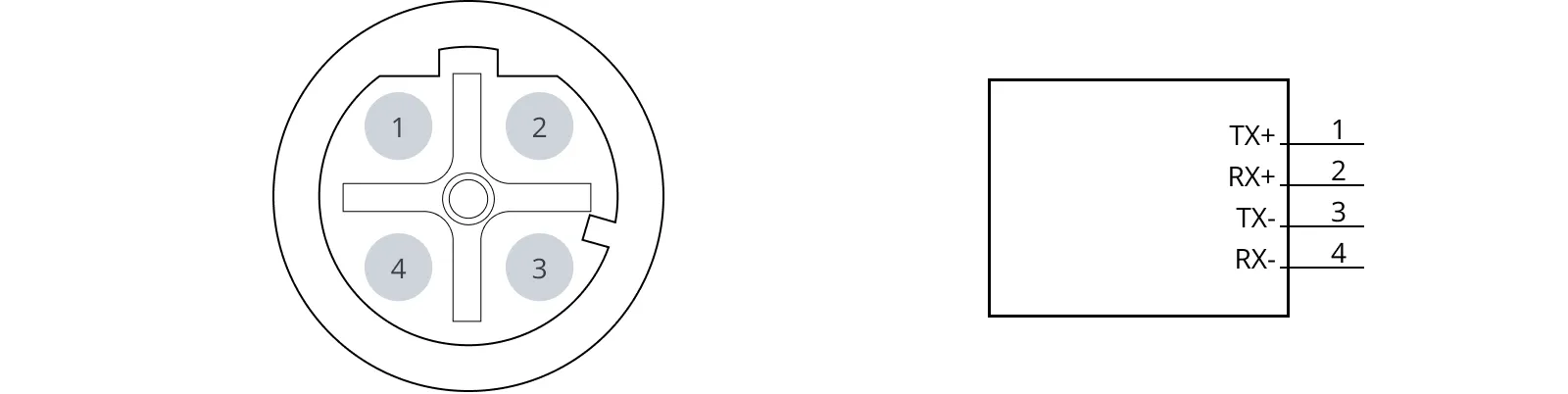
| Pin no. | Signal name | Pin no. | Signal name |
|---|---|---|---|
| 1 | TX+ | 2 | RX+ |
| 3 | TX- | 4 | RX- |
GPIO A and B
The GPIO supports low current and power devices like relays, contactors, lamps, and separate PLC units.
The GPIO pins are intended for the following:
- Output pins can be activated or deactivated in missions, zones, or directly is the robot web-interface under Setup > I/O modules.
- The status of an Input pin can be used for conditional or wait actions in missions, and can be read directly in the robot web-interface under Setup > I/O modules.
- RTN pins are used as ground.
- 24V pins provide 24 V constantly.
If the GPIO pins are not working as expected, ensure that the Shelf feature is disabled under System > Settings > Features. This feature uses the GPIO with specific MiR features.
Output pins must be connected to RTN pins, and input pins must be connected to 24 V pins.

Output interface
| Pin | Name | Limits | Function |
|---|---|---|---|
| 1 | OUT1 | 1 A at 24 V | Output 1 |
2 | GND | Protected return | |
| 3 | OUT2 | 1 A at 24 V | Output 2 |
4 | GND | Protected return | |
| 5 | OUT3 | 1 A at 24 V | Output 3 |
6 | GND | Protected return | |
| 7 | OUT4 | 1 A at 24 V | Output 4 |
8 | GND | Protected return |
Input interface
| Pin | Name | Limits | Function |
|---|---|---|---|
1 | IN1 | Input 1 | |
| 2 | 24V | 2 A | 24 V output |
3 | IN2 | Input 2 | |
| 4 | 24V | 2 A | 24 V output |
5 | IN3 | Input 3 | |
| 6 | 24V | 2 A | 24 V output |
7 | IN4 | Input 4 | |
| 8 | 24V | 2 A | 24 V output |
Auxiliary Safety Functions A and B
The Auxiliary safety functions interfaces support the safety functions described in Safety functions and interfaces.
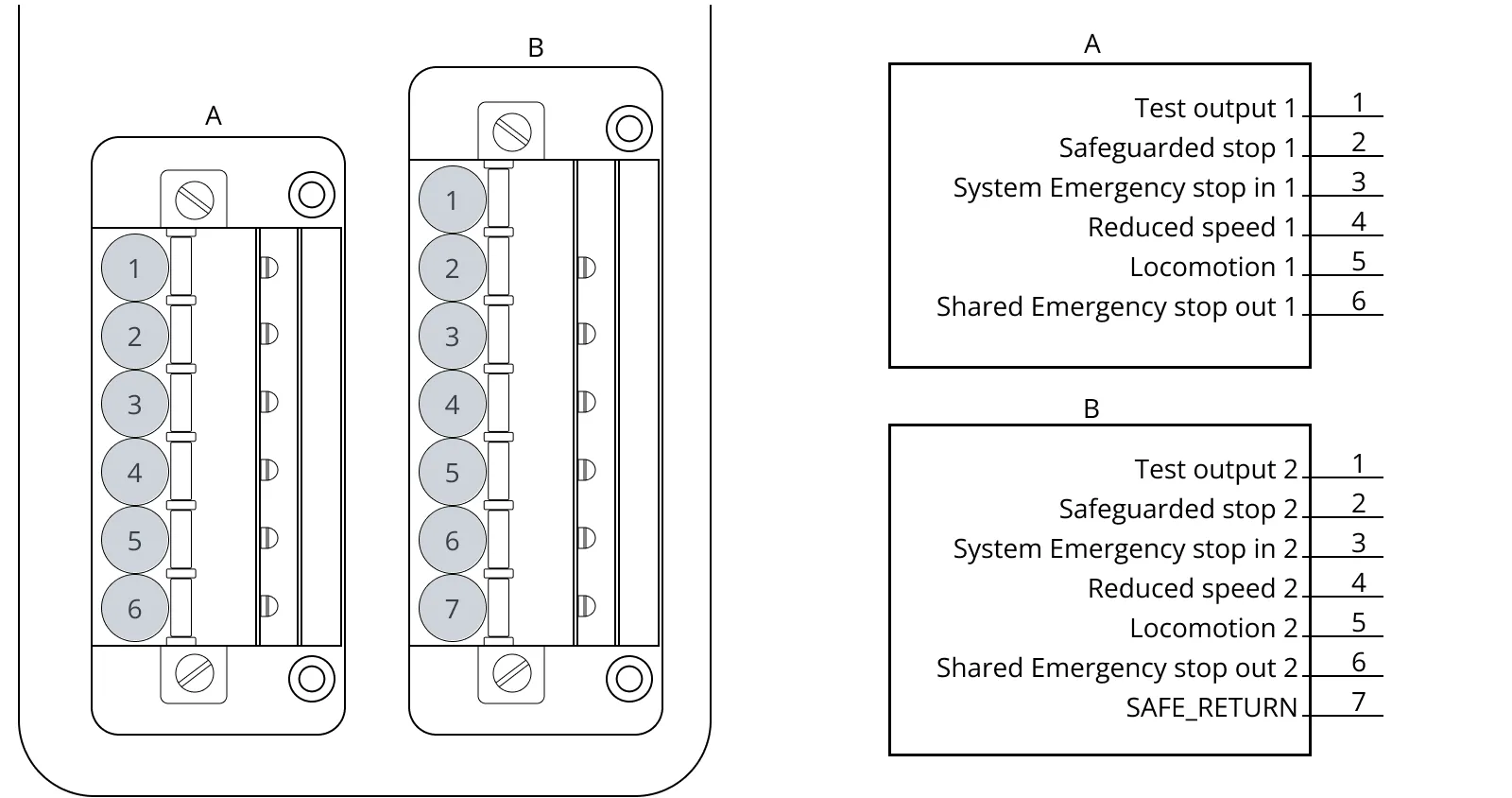
Interface A
| Pin no. | Description |
|---|---|
1 | Signal name: Test output 1 Type: Output Standard function: 24 V test signal. Sends test pulses (not on constantly). |
2 | Signal name: Safeguarded stop 1 Type: Input Standard function: When inactive, the robot enters Protective stop. If this pin and the other Safeguarded stop pin are unequally set for a period greater than three seconds, the robot must be restarted. |
3 | Signal name: System Emergency stop in 1 Type: Input Standard function: When inactive, the robot goes into Emergency stop. |
4 | Signal name: Reduced speed 1 Type: Input Standard function: When inactive, the robot drives with reduced speed. The reduced speed function is not a safety-rated function. |
5 | Signal name: Locomotion 1 Type: Output Standard function: Is active when the robot is standing still. |
6 | Signal name: Shared Emergency stop out 1 Type: Output Standard function: Inactive when an Emergency stop button is pressed. Active if all Emergency stop buttons are released, even if you have not pressed the Resume button. |
Interface B
| Pin no. | Description |
|---|---|
1 | Signal name: Test output 2 Type: Output Standard function: 24 V out test signal. Sends test pulses (not on constantly). |
2 | Signal name: Safeguarded stop 2 Type: Input Standard function: When inactive, the robot enters Protective stop. If this pin and the other Safeguarded stop pin are unequally set for a period greater than three seconds, the robot must be restarted. |
3 | Signal name: System Emergency stop in 2 Type: Input Standard function: When inactive, the robot goes into Emergency stop. |
4 | Signal name: Reduced speed 2 Type: Input Standard function: When inactive, the robot drives with reduced speed. The reduced speed function is not a safety-rated function. |
5 | Signal name: Locomotion 2 Type: Output Standard function: Is active when the robot is standing still. |
6 | Signal name: System Emergency stop out 2 Type: Output Standard function: Inactive when an Emergency stop button is pressed. Active if all Emergency stop buttons are released, even if you have not pressed the Resume button. |
7 | Signal name: SAFE_RETURN Standard function: Safe return for output signals. |
Connector list
| Connector | Description | Manufacturer | Part number |
|---|---|---|---|
| Power | Cable connector, M23, 6-way, male | Phoenix Contact | 1619775 |
| GPIO | Single wire connector, female, pitch 3.5 mm 8-way. | Phoenix Contact | 1952322 |
| Ethernet | Cable assembly, 1 m, M12, 4-way to RJ45 | Lumberg | 0985 806 103/1M |
| Auxiliary emergency stop | Cable connector, 8 + 2-way, XLR, male | Neutrik | NC10MXX-14-B |
| Auxiliary safety functions - long connector | Single wire connector, female, pitch 3.81 mm, 7-way | Phoenix Contact | 1851287 |
| Auxiliary safety functions - short connector | Single wire connector, female, pitch 3.81 mm, 6-way | Phoenix Contact | 1851274 |
| Antenna | Cable connector, RP-SMA, male, gold | AMPHENOL RF | RSMA1111A1-3GT50G-1A-50 |