
Operating the tiller
MiR1200 Pallet Jack can be controlled manually using the foldable tiller located at the front of the robot. You cannot use the tiller when the robot is turned off. Always have the tiller in Home position when starting up the robot—see Home position.
When controlling the robot using the tiller, it is the operator's responsibility to ensure the safety of nearby personnel. Being unaware of the risks and operating the robot without caution can result in injury to personnel or damage to equipment.
- Only trained operators can manually control the robot.
- Drive carefully to avoid collisions with any personnel or objects when controlling the robot with the tiller.
- Ensure that the LiDAR on top of the robot does not collide with low hanging obstacles.
- Be aware that you can drive the robot into Forbidden zones and Unpreferred zones on the map.
- Operating the robot with the tiller is only intended for initialization and maintenance situations or for potential deadlocks.
- For any manual intervention on MiR1200 Pallet Jack, ensure the robot is at standstill and idle before approaching it. If the signal lights on the robot are off, it is safe to approach the robot. When you approach the robot, press the Stop button and either activate the tiller, disconnect the batteries, or turn the Operating mode key to Maintenance mode or Locked mode.
- If you are using the robot to pick up or place a pallet that is in a pallet station above the floor, ensure there are no obstacles below the pallet that can collide with the deep lane camera or rear safety laser scanner.
Tiller positions
Home position
MiR1200 Pallet Jack can operate in Automatic mode when the tiller is in Home position. You can also control the robot manually when the tiller is in Home position, but the Creep speed safety function limits the forward and reverse speed to 0.12 m/s. When the tiller is put into Home position, the robot goes into Protective stop. Press the Restart button to clear the stop—see Control panel and display.
Drive position
You can control the robot manually when the tiller is in Drive position—see Tiller functions. If the tiller is moved to the Drive position while the robot is moving, a safety function will put the robot into Protective stop. Press the Restart button to clear the stop.
Safety stop position
When the tiller is in Safety stop position, the robot goes into Protective stop. To clear the Protective stop, put the tiller in Drive position or Home position, and press the Restart button.
Tiller functions
You can operate MiR1200 Pallet Jack using the functions in the tiller and on the tiller handle.
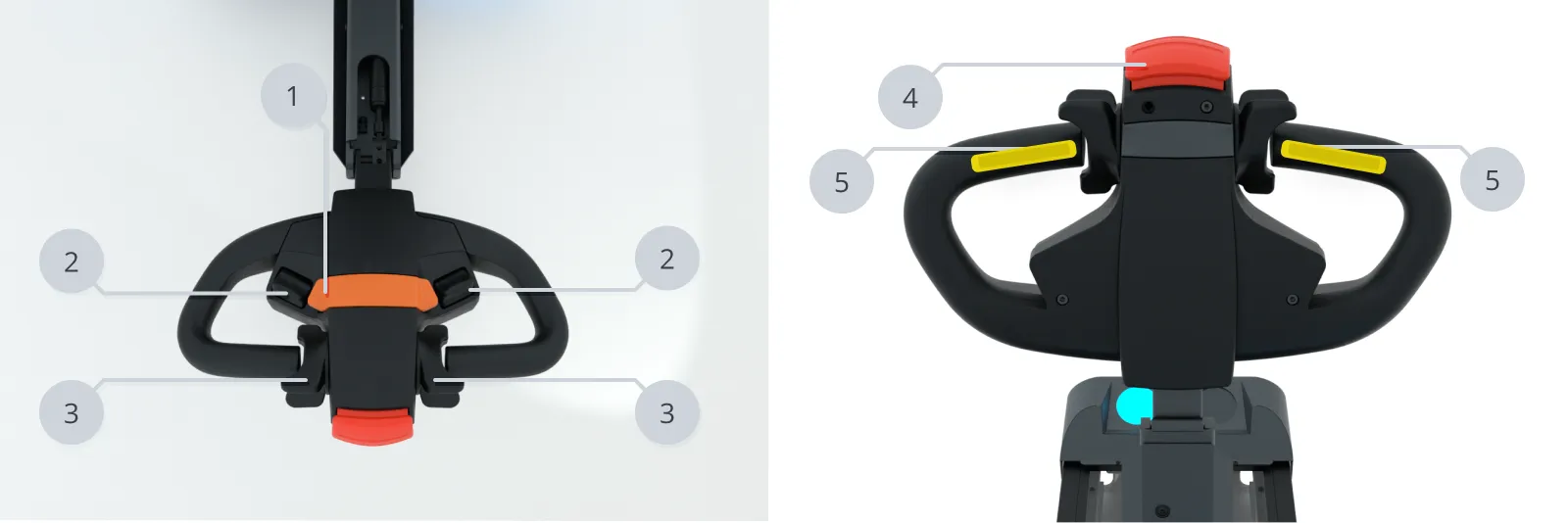
| Pos. | Description | Pos. | Description |
|---|---|---|---|
| 1 | Horn—see Light indicators and speaker | 2 | Lift controllers |
| 3 | Drive controllers | 4 | Safety stop button |
| 5 | Hold-to-run switch |
Hold-to-run switches
The hold-to-run switches enables the robot and forks to move. One or both of the switches has to be pressed when operating the robot. The hold-to-run switches are two-step switches. If one or both of the hold-to-run switches is either not pressed or is pressed hard, the Hold-to-run safety function disables robot movement.
Drive controller and steering
Steer the robot by turning the tiller. The control is based on electric signals, so if you move the tiller while the robot is turned off, the direction change is not registered.
Drive the robot backward or forward using the Drive controllers.
The Drive controller is a potentiometer, so the backward or forward driving speed increases with pressure on the knob. The forward maximum speed is 1.5 m/s and the reverse maximum speed is 0.8 m/s when MiR1200 Pallet Jack is operated by the tiller. When the tiller is in Home position, the Creep speed safety function limits the forward and reverse speed to 0.12 m/s.
Lift controller
Raise or lower the forks using the Lift controller. Press or pull harder to increase the lifting speed.
Safety stop button
The large Safety stop button on top of the tiller handle puts MiR1200 Pallet Jack into Protective stop. The button is not meant to be pressed deliberately but is a means to stopping the robot if the tiller accidentally presses into a person. The Safety stop button function is available in all tiller positions.
To clear the Protective stop, put the tiller in Drive position or Home position, and press the Restart button—see Control panel and display.
Horn
Press the horn to make the robot emit a sound. The horn function is available in all tiller positions and plays through the speaker—see Light indicators and speaker.