
Pallet and payload specifications
The robot is only intended to transport pallets within the supported dimensions and overhang. You must ensure that the correct SICK configuration is applied for the pallet type your robot transports.
MiR1200 Pallet Jack robots are shipped to handle EPAL1 pallets by default with a 50 mm overhang to all sides. MiR1200 Pallet Jack can only be configured to support one load type.
The robot's safety system, docking procedure, and intended use are designed and tested using pallets that meet the design requirements. Using pallets that do not meet requirements introduces additional residual risks and is unintended behavior.
MiR does not provide pallets.
The robot uses the top boards on the pallet as markers to dock to the pallet correctly—see Pallet specifications. Top boards must be within the requirements. The robot can dock to either side of the pallet. The robot can only pick up or place pallets from the side without pallet openings if the pallet or rack is raised from the ground.
If the robot has issues docking to a pallet, coat the end of the pallet with a non-reflective material that has a light, neutral color and maximum 10 GU (gloss). We recommend using a matte light gray.
Pallet specifications
MiR1200 Pallet Jack is designed for pallets and payloads with the dimensions described in this section.
If the robot transports a pallet outside of the dimensions supported by the applied SICK configuration file, the Protective fields are inadequate. The robot or its load may collide with personnel or obstacles.
Apply the SICK configuration file that matches with the pallets used on your site.
If your site uses several pallet types, ensure that the robot is only used with pallets it supports.
Inform relevant personnel that the robot can only be used with certain pallet types.
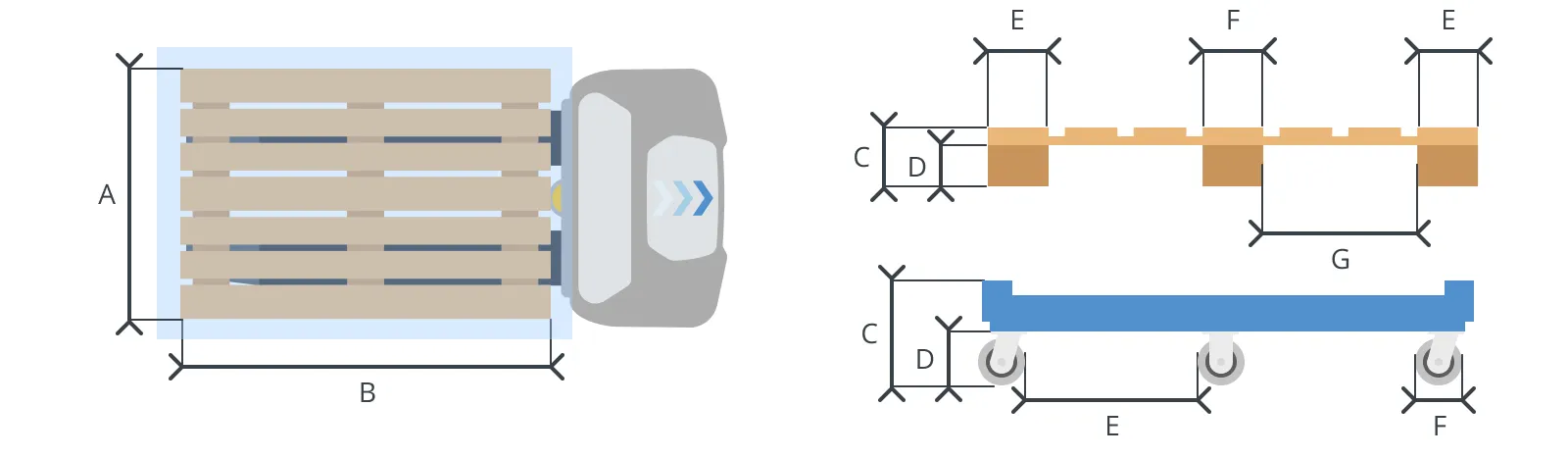
| Pallet type | Minimum SW version | Dimensions | ||||||||
|---|---|---|---|---|---|---|---|---|---|---|
EPAL 1 - wood | MFE 1.1.0 |
| ||||||||
EPAL 1 - gray or black plastic | MFE 1.2.0 |
| ||||||||
EPAL 1 - blue plastic | MFE 1.2.0 |
| ||||||||
EPAL 3 - wood | MFE 1.2.0 |
| ||||||||
EPAL 3 - gray or black plastic | MFE 1.2.0 |
| ||||||||
Nestable pallet (1163 × 1240) - black plastic | MFE 1.2.0 |
| ||||||||
Cart (1240 × 1240) - blue metal | MFE 1.2.0 |
|
Payload distribution
The following drawings illustrate where the center of mass (CoM) of payloads must be located for safe operation with different payloads.

WARNING
Load falling or robot overturning if the load on the robot is not positioned or fastened correctly can cause damage to equipment and injury to personnel.
Ensure that the load is positioned and fastened correctly.
Do not fasten excessive or incorrectly distributed loads.
The robot is designed to carry a payload that:
Weighs up to 1 200 kg, including the weight of the pallet.
Is maximum 2 meters in height.
Does not exceed the footprint of the pallet and payload more than the dimensions in Pallet specifications.
The exact payload limit depends on the pallet design, payload distribution, application, and driving surface. It is the responsibility of the commissioner to determine the safe payload limit each pallet can support.
Use shrink wrap to fasten all payloads that can come loose during operation. It is the responsibility of the operator to ensure a stable payload.
WARNING
The robot can drive with the forks at any height. There is a risk of the payload colliding with low-hanging obstacles if the robot drives with a load while the forks are raised.
Ensure all hanging obstacles are higher than the height of the tallest payload and the robot's maximum lift height.
If there are obstacles that you cannot remove or raise, place a Forbidden zone over it in the robot's map. This will prevent all robots connected to MiR Fleet from driving below the obstacle.
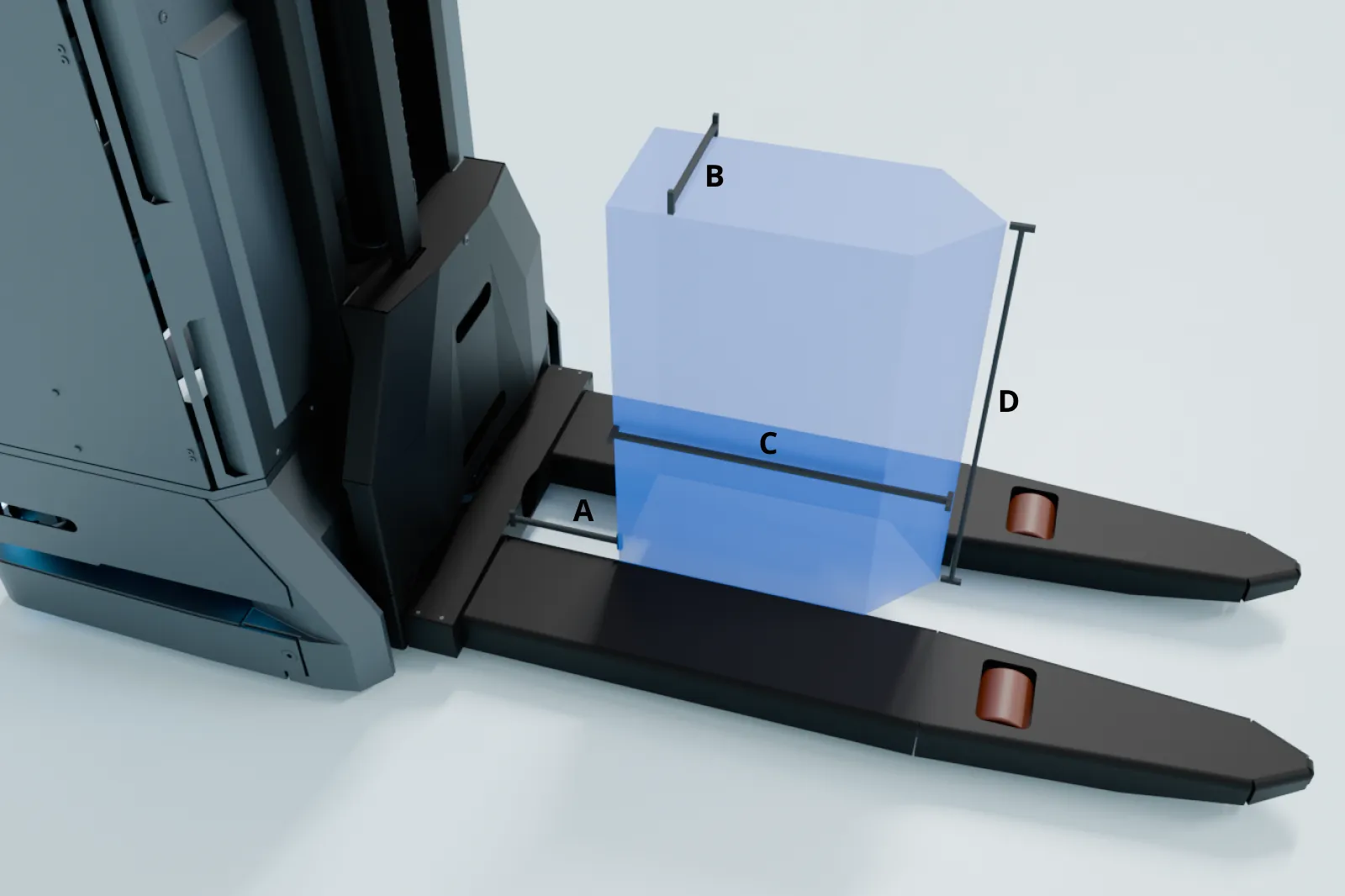
| Payload | 600 kg | 800 kg | 1 000 kg | 1 200 kg |
|---|---|---|---|---|
| A | 250 mm | 250 mm | 325 mm | 400 mm |
| B | 100 mm | 100 mm | 75 mm | 50 mm |
| C | 500 mm | 450 mm | 350 mm | 250 mm |
| D | 600 mm | 600 mm | 600 mm | 600 mm |